Corporate Relocation Services | How to Move Offices Smoothly
Corporate relocation services help businesses move efficiently by managing every aspect of the transition, from employee support like housing and travel arrangements to temporary storage. Rather than navigating the complex logistics alone, companies rely on these moving experts to minimize downtime and keep operations running smoothly throughout the move. With the right corporate relocation service, your team can hit the ground running in the new office while you stay focused on the business.
At Stack Moves, we know how chaotic corporate moves can be, we’ve been a part of hundreds of them. We offer sturdy, reusable plastic moving crates for rent that make packing faster, cleaner, and a lot less stressful. If you’re planning to move your business, contact us to rent our budget-friendly office moving crates.
In this blog, we’ll walk you through everything you need to know about corporate relocation services from the different types of moves to the key services typically included in a relocation package. We’ll also cover how to choose the right relocation partner to make your next move as smooth and stress-free as possible.
Comprehensive Overview of Corporate Relocation Services
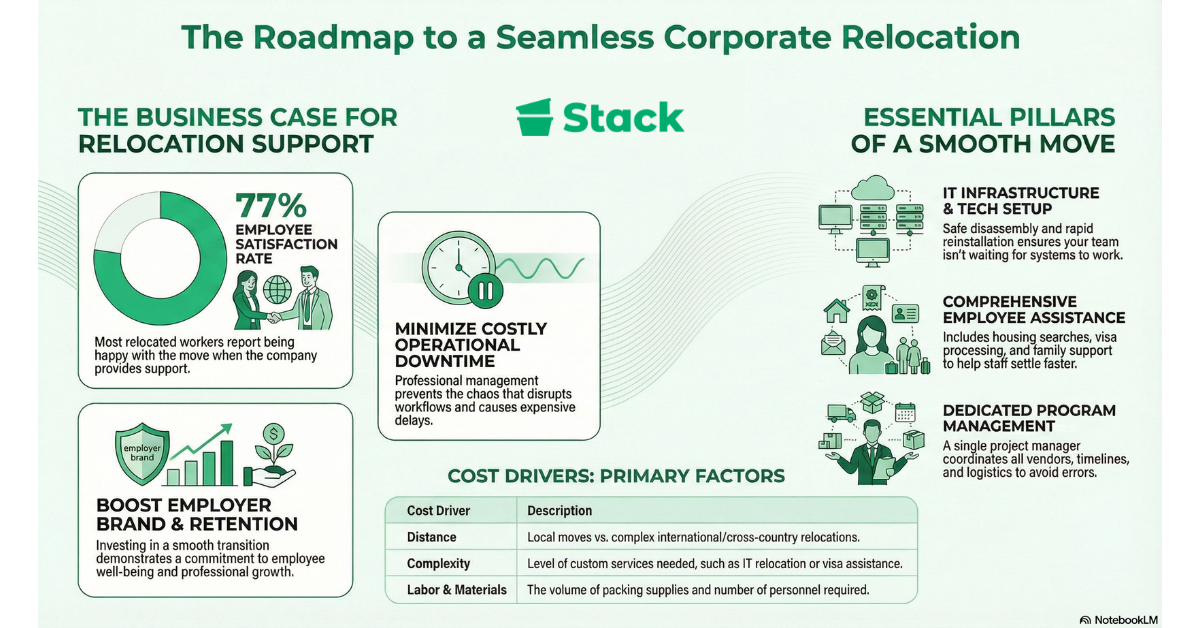
The most obvious benefit of working with a corporate relocation service provider is that it significantly reduces downtime. Corporate relocation services are professional moving solutions designed to help businesses transition their offices, employees, or entire operations to a new location without the chaos that usually comes with it.
A poorly managed move can disrupt workflows, frustrate employees, and cost your business more than you’d expect. With the right corporate relocation service in your corner, you get a smoother move, a faster restart, and a team that actually feels taken care of.
Key Services Included in Corporate Relocation Solutions

No two corporate moves look the same, but the best relocation packages tend to cover the same essential bases. Here’s a breakdown of the key services you’ll typically find and what they actually mean for your business:
Office Packing and Unpacking
Professional relocation teams carefully pack, label, and transport everything from office furniture to sensitive documents, then set it all back up at your new location so you’re not starting from scratch on day one.
IT Infrastructure Setup and Tech Support
One of the most disruptive parts of any office move is getting your tech back up and running. IT relocation services handle the safe disassembly, transport, and reinstallation of your equipment so your team isn’t sitting around waiting for the internet to work.
Employee Relocation Assistance
This service covers everything from housing search assistance and temporary accommodation to school searches for families and expense management. The goal is to make sure your people feel supported, not stranded.
Temporary Storage Solutions
Sometimes your new space isn’t ready when the old one needs to be cleared out. Temporary storage options keep your equipment and furniture secure in the gap, so nothing gets lost or damaged in the shuffle.
Cultural Training and Settling-In Support
This service helps employees adapt to a new environment. It covers everything from language support to navigating local systems like healthcare and banking.
Home Search and Housing Assistance
Relocation specialists help employees find suitable housing quickly, whether that’s a short-term rental or a permanent home, so they can settle in and get to work faster.
Immigration and Visa Solutions
For international moves, navigating visa applications, work permits, and compliance with local labor laws can be a minefield. Relocation providers with international experience handle the paperwork and ensure everything is above board before your employee sets foot in a new country.
Expense Management and Relocation Budgeting
Tracking and managing relocation costs across multiple employees or departments can get messy fast. This service helps businesses set relocation budgets, reimburse employees correctly, and keep the entire move financially organized.
Spouse and Family Career Support
When an employee relocates, their partner’s career is disrupted too. Some relocation packages include job search assistance and career coaching for spouses, which significantly improves employee retention post-move.
Pet Relocation Services
This covers transportation, health certifications, and any quarantine requirements. It’s especially critical for international moves.
Program Management
Think of this as having a dedicated project manager for your entire relocation. They coordinate every vendor, timeline, and moving part so nothing falls through the cracks.
Post-Move Support and Follow-Up
The job isn’t done when the last box is unpacked. Post-move support checks in with employees, addresses any lingering issues, and ensures everyone has fully settled into the new location.
Why Do Businesses Invest in Corporate Relocation Services?
Consider a mid-sized tech company relocating its 50-person team from New York to Austin. Without a structured relocation program, they risked losing key employees unwilling to manage the move themselves. But with the assistance of a full-service corporate relocation company, they can streamline the entire process and hadve their team operational in as little as two weeks from moving day.
Corporate relocation services are designed to make job-related moves easier for the company and its employees. While some people might see corporate relocation services as a nice extra service to consider when relocating, they’re actually an investment in your business. And it should be an integral part of your long-term global mobility program.
According to SHRM, 77% of workers who relocated reported being happy with the move and not regretting the decision. Companies that support their staff in terms of relocation tend to enjoy smoother onboarding and lower staff turnover. A well-supported move helps your employees settle in faster and makes them feel valued.
Relocation support also boosts your employer brand. When potential hires see that you invest in your team’s smooth transition, it shows that you care about their well-being and are committed to supporting them both professionally and personally.
On top of that, turnover and downtime can be costly for your business. With a structured relocation program in place, you can cut both. When your employees settle in comfortably, they can contribute to the company sooner. Plus, they’re less likely to leave due to the stress of a poor relocation experience.
Ultimately, businesses that invest in relocation services see returns in terms of productivity, loyalty, and long-term talent growth. And businesses that don’t have to continuously cover the costs associated with repeatedly onboarding employees.
Types of Corporate Relocation

Each type of corporate relocation comes with its own set of challenges. Whether you’re relocating employees or offices or expanding internationally, a good understanding of what these moves entail can help you plan more effectively.
Employee Relocation
Employee relocations are the most common type of relocation. It involves moving an employee (sometimes with their family) to a new location. This usually happens when the company hires someone from out of town or promotes or transfers them to a new role in another branch.
The biggest hiccup with relocating employees is the stress and uncertainty they have to go through during the move. A poorly managed move can lead an employee to question if the job is worth the trouble, which is a major risk, especially after months of recruitment efforts.
This move can impact the employee’s job performance and even their employee satisfaction. Beyond the physical move, employees also have to adjust to a new commute, find new schools for their children, and adapt to a potentially different culture. All of which can affect their job satisfaction and performance.
Office or Facility Relocation
This type of move involves moving an entire team or business to a new space. This typically happens when the business needs to upgrade to a larger and more functional office or expand its operations.
A major challenge with office relocations is the downtime and the impact it has on your business. If things don’t go well, it can throw off internal workflows, frustrate employees, and confuse your clients. Coordinating furniture, IT systems, and important documents alone can get overwhelming fast without the right help.
Understand that for a move like this, you’re not just moving desks – you’re relocating your entire operation. Key services for this kind of move typically include office packing and unpacking, furniture and equipment moving, IT infrastructure setup and tech support, temporary storage solutions, pre-move planning, and post-move support.
Domestic vs. International Moves
You might be tempted to think “a move is a move,” but cross-country relocations are an entirely different ball game. Domestic moves involve relocating employees or offices within the same country and tend to be more straightforward logistically.
International moves are more complicated than that. Factors like visa requirements, cultural adaptation, and managing relocation benefits under international labor laws must be considered. Some of the key support areas here include immigration assistance and visa processing, cultural training and language support, international shipping and customs coordination, school search for families, and guidance on navigating a new country’s systems.
A major roadblock with international moves is culture shock. Employees often face overwhelming changes, from healthcare to daily communication. That’s why comprehensive relocation services are critical in ensuring a positive relocation experience.
How to Choose the Right Corporate Relocation Services Provider
The success of your move largely depends on who you entrust it to. A top relocation company will do more than help you move around your furniture. Because every relocation comes with its unique challenges, these companies will help you design a moving plan that meets your company’s needs. We advise you to look for an industry leader with a reputation for delivering seamless moves across borders and departments. A few non-negotiable things to consider when looking for a corporate relocation partner are:
- Industry Experience and Specialization: Confirm that they have a proven track record in your industry and that they can handle the scale of the move you’re planning.
- Client Testimonials and Case Studies: Look for verified feedback from people with similar needs as yours who have used these companies.
- Pricing Models and Package Options: Find out if their packages suit your budget and whether they cover employee relocation expenses.
- Technology and Tracking Tools: Work with a partner who uses advanced tools for tracking, planning, and staying on top of the relocation process. These tools help avoid delays, as you can monitor the move’s progress in real-time.
- Employee Support Programs: Moving can be a stressful experience for employees. With a strong relocation partner, you can provide support for your team members throughout the process by providing them with the resources needed to settle in quickly and confidently.
Best Corporate Relocation Companies
The best providers offer a range of services designed to meet the complex needs of every business they come across. We’ve put together a list of the top 10 corporate relocation companies, based on industry reputation, service offerings, and client reviews.
- Cartus
- Graebel
- SIRVA
- Aires
- Weichert Workforce Mobility
- Altair Global
- Xonex
- Crown Relocation
- Atlas Van Lines
- Move Solutions
How Much Do Corporate Relocation Services Cost?

Corporate relocation costs vary significantly due to several factors, including the size of the office, the distance of the move, and the relocation services required. On average, a full-scale office move can range from $5,000 to over $100,000.
If you’re trying to create a realistic budget, our breakdown on the cost of moving an office is a great place to start. And if you’re working with a relocation Management Company (RMC), they may offer lump-sum pricing options to make planning ahead and staying on top of your expenses easier.
A couple of things that could skyrocket your office-moving cost include the following:
- Labor Costs: How many people do you need to pack and for how long?
- Materials and Supplies: What type of boxes and how many of them do you need to get everything boxed up?
- Distance: Is your move local or global?
- Complexity of the Move: Will custom services like IT relocation or employee travel be required?
- Downtime: How long will your business be offline, and what will the financial impact be?
Tips to Budget Corporate Relocation More Effectively
A smart way to cut costs without compromising on quality is to start planning early. When you plan ahead, you get a chance to compare multiple quotes and secure the best deal available. You also get to create a relocation policy that will guide your team on what is expected of them throughout the move.
Another way to reduce your moving costs is to work with a relocation partner that offers tailored solutions. This will help you avoid paying for services that you don’t need. Another simple way to keep your moving costs low is to control your moving supply expenses. Boxes, packing materials, and containers can quietly eat into your relocation budget, especially for larger moves. A simple way to bring that cost down is to rent your moving boxes rather than buying them.
Corporate Relocation Packing Checklist
Every move should start with a plan. To keep things on track, you should:
- Set a relocation budget and timeline,
- Organize packing materials ahead of time,
- Assign move-related tasks across departments,
- Create a packing schedule and communicate key dates,
- Inform key stakeholders about your move,
- Transfer your utilities to your new location.
For a more comprehensive, step-by-step breakdown of everything you need to do before, during, and after your move, check out our office moving checklist.
Ready to Make Your Corporate Relocation Stress-Free?
Whether you’re relocating a single employee or your entire headquarters, without the right support, your move will be slow and stressful. With the help of an experienced Relocation Management Company (RMC), you can cut down on relocation expenses and preserve productivity without impacting your employees’ experience.
At Stack, we focus on providing exceptional service through our sturdy moving crates. Our team is here to help you choose the right moving boxes for your needs. After you’ve made your choice, they can be delivered to your office and picked up at your new one to make your move smoother. Let’s get your relocation strategy in motion. Contact us today!
Frequently Asked Questions
Got questions about corporate relocation services? We’ve answered the most common ones below to help you plan your next move.
What Is a Corporate Relocation Service?
A corporate relocation service is a professional solution that manages the entire relocation process for businesses. Whether you’re handling a domestic office move or a global corporate relocation, these services are designed to keep your operations running smoothly throughout the transition.
What Does a Corporate Relocation Program Typically Include?
A corporate relocation program usually covers a wide range of customized services, including office logistics, employee housing assistance, visa and immigration support, and post-move follow-up. The best providers offer personalized service tailored to your business size, industry, and specific moving needs.
How Do Corporate Relocation Services Handle International Moves?
International relocation involves a lot more than just shipping boxes overseas. An experienced team will manage everything from visa processing and customs coordination to cultural training and family support, making global relocation as seamless as possible for your employees.
How Can Businesses Control Costs During a Corporate Move?
Cost control starts with early planning and working with a relocation partner that offers flexible, tailored packages so you’re not paying for services you don’t need. Transparent pricing, detailed budgeting tools, and smart decisions like renting moving boxes instead of buying them can all make a significant difference to your bottom line.
How Is Corporate Relocation Different From a Regular Commercial Move?
While commercial moving focuses primarily on the physical transportation of office furniture and equipment, corporate relocation is a much broader service. It encompasses the entire relocation process, completely managed by an experienced team.
How Long Does a Corporate Relocation Typically Take?
The timeline varies depending on the size and complexity of the move, but most corporate relocations take anywhere from a few weeks to several months to plan and execute. A well-structured corporate relocation program with clear milestones and dedicated project management will keep things on track and avoid unnecessary delays.
Can Corporate Relocation Services Be Customized for Our Business?
Absolutely. The best providers understand that no two moves are alike and will work with you to build a package that fits your specific needs and budget. From single-employee international relocation to full-scale global corporate relocation for entire departments, a good provider will always lead with personalized service over a one-size-fits-all approach.